
Thailand has launched a new mobile app called THIM — Thailand Immigration Management System — which allows all foreign arrivals to complete their mandatory digital arrival card on a smartphone before they land. The app is published by the Royal Thai Police and is available on iOS and Android. It replaces the older web-based TDAC process with a cleaner interface, though the TDAC portal remains a valid alternative for now. At GEOS, our 20+ years of MOE recognition means we guide students through every step of arriving in Bangkok and starting their ED visa process — including what to put in the THIM app before their flight. A few fields in the app are not obvious for students enrolling in a language program, and getting them wrong can cause unnecessary confusion at the immigration counter. Here is exactly how to complete the THIM app as a GEOS student.
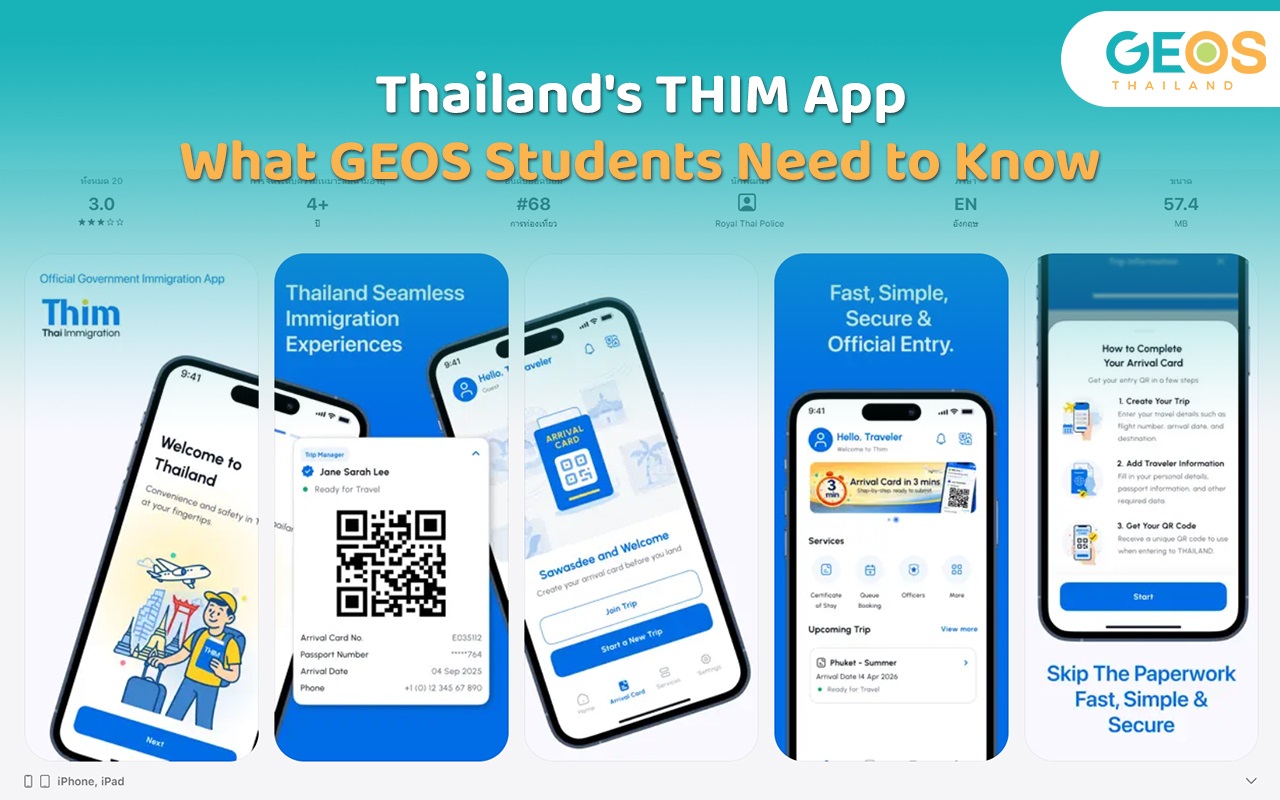
THIM (Thailand Immigration Management System) is Thailand’s new official immigration mobile app, developed by Digital Identity Co., Ltd. in partnership with the Thailand Immigration Bureau, built on Amazon Web Services cloud infrastructure. It is designed to replace the older online TDAC form with a mobile-first process that takes around three minutes to complete.
The mandatory digital arrival card — previously completed at tdac.immigration.go.th — can now be submitted through the THIM app instead. The app is currently in its launch phase and is available for download on the App Store and Google Play. Future updates will add visa extensions and 90-day reporting to the same platform.
You do not have to use the THIM app — the official TDAC website remains available. But the app is simpler, and the process is cleaner for most travelers.
Thai Immigration Bureau — official source for THIM app information and the TDAC portal.

Step 1 — Download the app
Search for THIM on the App Store or Google Play. Make sure it is published by the Royal Thai Police — there are copycat apps. Download and create an account.
Step 2 — Set up a new trip
Select “New Trip” under the Arrival Card section. Give the trip a name (your arrival date works well). Enter the country where you are boarding your flight — this is your departure country, not any transit points.
Step 3 — Enter your purpose of visit
What you select here should match your entry status.
If you are arriving on a visa exemption, select “Tourism” or “Holiday”. You do not have a student visa yet, so your entry type is visitor. You will convert to an ED visa after enrolling at GEOS.
If you are arriving on an ED visa you have already obtained from a Thai embassy abroad, select “Education”. Your visa type and stated purpose are aligned.
If you are arriving on a tourist visa, select “Tourism” or “Holiday” to match your visa type.
Step 4 — Enter your arrival and departure dates
Enter your arrival date and flight number.
If you are arriving on a visa exemption, enter your planned departure date or return flight date. Immigration expects tourists to have onward travel, and you likely need a return ticket for entry anyway. You can adjust your plans once your ED visa is approved.
If you are arriving on an ED visa already obtained from a Thai embassy abroad, select “I cannot provide a departure date” and choose the appropriate option from the dropdown. Your long-term stay is already confirmed by your visa.
Step 5 — Enter your accommodation
Enter the address where you will be staying on your first night in Thailand. If you have not yet arranged permanent accommodation, use your hotel or temporary address. You can use Google Maps to copy the full address accurately. Minor errors in the district or subdistrict dropdown will not cause issues at immigration.
If you need help finding accommodation in Bangkok before you arrive, GEOS’s real estate support service can help you arrange a condo and handle TM30 registration before your first immigration appointment.
Step 6 — Add your personal details
You can scan your passport photo page to auto-populate your details, or fill them in manually. Make sure your name matches your passport exactly — including any middle names. Discrepancies can cause delays at the immigration counter.
Step 7 — Complete the health declaration within 72 hours of arrival
The health declaration cannot be completed until you are within 72 hours of your arrival. Log back into the app during that window to complete it. You will need to declare any countries visited in the 14 days before arrival. Once you submit the health declaration, your registration is complete.
Step 8 — Confirm your registration is complete before you board
Once your health declaration is submitted and confirmed in the app, you do not need to show a QR code at immigration. THIM syncs your data directly with the immigration bureau’s system — officers verify your registration automatically when they scan your physical passport on arrival. Simply make sure the app shows your registration as complete before you board your flight.
The THIM app handles your arrival in Thailand. Once you land and clear immigration, your next step is enrolling at GEOS and starting the ED visa application process as quickly as possible.
The ED visa application takes 50 to 60 days from enrollment to approval — longer if your nationality requires a criminal background check. For a full overview of the timeline and documents, see our ED visa application guide
Contact GEOS as soon as you arrive in Bangkok. The earlier you start the application, the more comfortable your timeline will be.
The TDAC website at tdac.immigration.go.th remains a valid option. The THIM app is an alternative mobile interface for the same process. Both complete the same mandatory arrival card. The THIM app is simpler and more convenient, but not compulsory at this stage.
No. THIM does not require you to show a QR code. Your registration data syncs directly with the immigration bureau’s system and is verified automatically when the officer scans your physical passport. Simply ensure your registration is confirmed as complete in the app before you board.
It depends on how you are entering Thailand. If you are arriving on a visa exemption or tourist visa, select “Tourism” or “Holiday” — this matches your entry status. If you are arriving on an ED visa already issued by a Thai embassy abroad, select “Education.” Your stated purpose and visa type should always be consistent with each other at the immigration counter.
Enter your first night’s hotel or temporary accommodation address. You are not required to provide your permanent Bangkok address at this stage. Once you have arranged long-term accommodation, your landlord will file a TM30 notification. GEOS helps students with accommodation and TM30 registration through our RE Property Bangkok partnership.
THIM is planned to expand into a full immigration platform covering visa extensions, 90-day reporting, and other services. Most sources cite October 1, 2026, as the full rollout date, though some reports indicate August 2026. Check the Thai Immigration Bureau for official confirmation. For now, ED visa extensions are still processed in person at Chaeng Watthana Immigration.
You can edit most trip details in the app up until you complete and submit the health declaration within the 72-hour window. If you have already submitted and notice an error, contact GEOS before your flight so we can advise on the best approach. Minor errors in fields like district or subdistrict will not typically cause issues at the immigration counter.
The THIM app simplifies the arrival process for students coming to Bangkok. Download it before your flight, complete the trip details in advance, and finish the health declaration within 72 hours of landing. Ensure your registration shows as confirmed in the app — no QR code is needed at the immigration counter.
Once you land, contact GEOS as soon as possible to start your ED visa application. After 20+ years of guiding students through Bangkok’s immigration process, we know exactly what you need and when you need it. Contact us before you travel, and we will confirm your timeline, documents, and first steps.
Explore our collection of captivating articles, each offering a unique perspective
GEOS Thailand is conveniently located in the heart of Bangkok, close to Asoke BTS and Sukhumvit MRT stations.
enquiry@geosthai.com